A dashboard warning on a Mercedes-Benz Sprinter 2.1L can send you looking for anything from an exhaust pipe to an ECU setting. The search phrase “Sprinter 2.1 delete OM651” covers both physical exhaust changes and ways to suppress selected dashboard warnings with the hardware still in place. Start by identifying the system named in the warning.
DPF and AdBlue on the Sprinter 2.1L OM651
The search wording “AdBlue DPF diesel” groups two systems that handle different parts of the exhaust:
- The diesel particulate filter (DPF) traps soot. The ECU uses pressure readings to monitor the filter, and those readings vary with exhaust flow and operating conditions.
- Selective catalytic reduction (SCR) reduces nitrogen oxides (NOx). A DEF injector doses AdBlue into the exhaust, and NOx sensors help the ECU monitor SCR performance. “AdBlue delete” refers to changes involving this system.
A dashboard warning tells you what condition the ECU detected. The underlying cause still needs confirmation.
Exhaust hardware and ECU changes for a Sprinter delete
Broad searches such as “Sprinter delete” and “delete exhaust” can lead to parts listings and ECU changes. When you review Sprinter listings under “complete DPF delete” or “Rawtek DPF delete,” check whether the description covers exhaust hardware, ECU tunes or both. If a kit is sold with a stainless straight pipe, check what the box includes and which exhaust part the pipe replaces. A listing may use “cat” as shorthand for catalytic converter.
How to read a Sprinter delete listing| Listing detail | What to look for |
|---|
| Stainless pipe in a Sprinter delete kit | The parts list can tell you whether the kit includes the fittings for the replacement pipe. |
| Sprinter delete tune sold on its own | The description should say whether the tune assumes the original hardware stays in place. For DPF delete tuning, check whether the tune requires a separate exhaust kit. For a Sprinter, check that the tuning description specifies the OM651 engine and identifies the system the tune changes, such as the DPF. An exhaust part name alone leaves tuning compatibility unconfirmed. |
| AdBlue delete for a Mercedes Benz Sprinter | Look for any SCR parts the description calls for removing or unplugging. |
| Sprinter delete listing with multiple model years | Look for the 2.1L OM651 in the fitment details even if the title already names the van. |
| Regional label on a Sprinter delete listing for DPF exhaust kits | The fit of exhaust parts can be highly specific to the model year and engine. A broad “North America” label alone leaves fitment for a specific OM651 unconfirmed. |
| DPF delete listing for the Sprinter | If you plan to keep the filter, check whether the listing describes any changes to soot monitoring or filter regeneration. |
A “high flow” label describes a claim about exhaust flow. Claims about an increase in power or torque, improved fuel economy, sharper throttle response or better turbo reliability each need evidence for the specific van and setup. Before changing emissions settings on a van you drive on public roads, including the highway, check the rules that apply to its use.
When you can leave the hardware in place
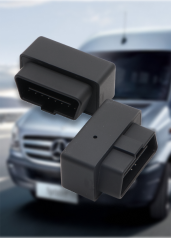
The OBDtune store sells a handheld tool that connects to the OBD port on supported Mercedes-Benz diesel vehicles. The tool communicates with the ECU. With the appropriate supported delete script, you can skip exhaust hardware removal when the goal is to suppress selected DPF or SCR dashboard warnings. A failed component still needs repair. Even if a delete setting matches the emissions configuration of a Sprinter with the 2.1L OM651, clearing a warning or selecting that setting cannot restore normal exhaust flow through a physically clogged DPF or repair a damaged filter. Assess the van’s condition before driving it.
When choosing a script for Mercedes-Benz Sprinters, we recommend checking fitment by model year, engine and emissions configuration. Parts listings may group Mercedes-Benz models with the Freightliner Sprinter. OBDtune supports Mercedes-Benz diesel vehicles only.
Follow these steps on a supported van: connect the tool to the OBD port, open the script selection menu on the media screen and choose the supported script, wait for it to finish and unplug the tool. For configurations without a media screen, a microSD card can provide script selection.